|
10 December 2012
AutoPostback in ASP.NET
- AutoPostback or Postback is nothing but submitting page to server.
- AutoPostback is webpage going to server, Server processes the values and sends back to same page or redirects to different page.
Click on the above button and observe the progressbar of browser.
Just Postback happenedWhen you click on above button, the request goes to server below. The server processes the request(The code executes) and returns the output(response) to webpage.

In the above picture , you can observe what happens on server side. Page.IsPostback value will be true if it is postback.
What is Inheritance in C#
Creating a new class from existing class is called as inheritance.
//All the car properties can be used by the supercar
class SuperCar : car
{
}
class SuperCar : car
{
}
When a new class needs same members as an existing class, then instead of creating those members again in new class, the new class can be created from existing class, which is called as inheritance.
Main advantage of inheritance is reusability of the code.
During inheritance, the class that is inherited is called as base class and the class that does the inheritance is called as derived class and every non private member in base class will become the member of derived class.
If you want the base class members to be accessed by derived class only , you can apply access modifier Protected to the base class member.
There are 5 Different types of inheritance.
Syntax
[Access Modifier] class ClassName : baseclassname
{
}
C# Inheritance Example
//Example program demonstrates singular inheritance
using System;
namespace ProgramCall
{
class BaseClass
{
//Method to find sum of give 2 numbers
public int FindSum(int x, int y)
{
return (x + y);
}
//method to print given 2 numbers
//When declared protected , can be accessed only from inside the derived class
//cannot access with the instance of derived class
protected void Print(int x, int y)
{
Console.WriteLine("First Number: " + x);
Console.WriteLine("Second Number: " + y);
}
}
class Derivedclass : BaseClass
{
public void Print3numbers(int x, int y, int z)
{
Print(x, y); //We can directly call baseclass members
Console.WriteLine("Third Number: " + z);
}
}
class MainClass
{
static void Main(string[] args)
{
//Create instance for derived class, so that base class members
// can also be accessed
//This is possible because derivedclass is inheriting base class
Derivedclass instance = new Derivedclass();
instance.Print3numbers(30, 40, 50); //Derived class internally calls base class method.
int sum = instance.FindSum(30, 40); //calling base class method with derived class instance
Console.WriteLine("Sum : " + sum);
Console.Read();
}
}
}
namespace ProgramCall
{
class BaseClass
{
//Method to find sum of give 2 numbers
public int FindSum(int x, int y)
{
return (x + y);
}
//method to print given 2 numbers
//When declared protected , can be accessed only from inside the derived class
//cannot access with the instance of derived class
protected void Print(int x, int y)
{
Console.WriteLine("First Number: " + x);
Console.WriteLine("Second Number: " + y);
}
}
class Derivedclass : BaseClass
{
public void Print3numbers(int x, int y, int z)
{
Print(x, y); //We can directly call baseclass members
Console.WriteLine("Third Number: " + z);
}
}
class MainClass
{
static void Main(string[] args)
{
//Create instance for derived class, so that base class members
// can also be accessed
//This is possible because derivedclass is inheriting base class
Derivedclass instance = new Derivedclass();
instance.Print3numbers(30, 40, 50); //Derived class internally calls base class method.
int sum = instance.FindSum(30, 40); //calling base class method with derived class instance
Console.WriteLine("Sum : " + sum);
Console.Read();
}
}
}
Output
First Number: 30
Second Number: 40
Third Number: 50
Sum : 70
29 November 2012
Overview Of Team Foundation Server
With Visual Studio Team System (VSTS), Microsoft has made available an integrated set of tools which are used by members of the software development team. Each of these persons is going to play one or multiple roles. One can vary easily imagine roles of Business Analyst, Project Manager, Technology Solution Architect, Developer, tester and Release Manger. These roles use different tools which suit them. For example Developers over the years have used Visual Studio to create code and Project Managers use MS Project for creating, monitoring and controlling a project. All the tools used by various roles work on the same data which makes them integrated. These tools also need to access some services for managing the data. The data storage and the common services are provided by a server component of VSTS which is called Team Foundation Server.


In this article we will take an overview of Team Foundation Server and services offered by Team Foundation Server.
Team Foundation Server (TFS)
TFS is the heart of VSTS. It pumps the required data and provides required services to the various client applications. It allows all the team members to collaborate with each other. It is a server which incorporates some of the best software technologies created by Microsoft like ASP.NET 2.0, Windows SharePoint Services, SQL Server 2005 etc.
TFS Architecture
Logical Architecture
TFS is a multilayered server. It is divided in the layers of Data Layer and Application Layer.
The data layer and the application layer can be on the same machine if the number of clients is less than 20.
Data layer is implemented in SQL Server 2005. When TFS is installed it creates number of database and tables for maintaining the data of the users, work items, source control and other resources. Being implemented on SQL Server 2005, data layer provides excellent scalability and performance.
Application layer is implemented through set of services which are available over the network. Most of them are configured as webservices which makes them possible to be accessed even over the Internet.
Physical Architecture
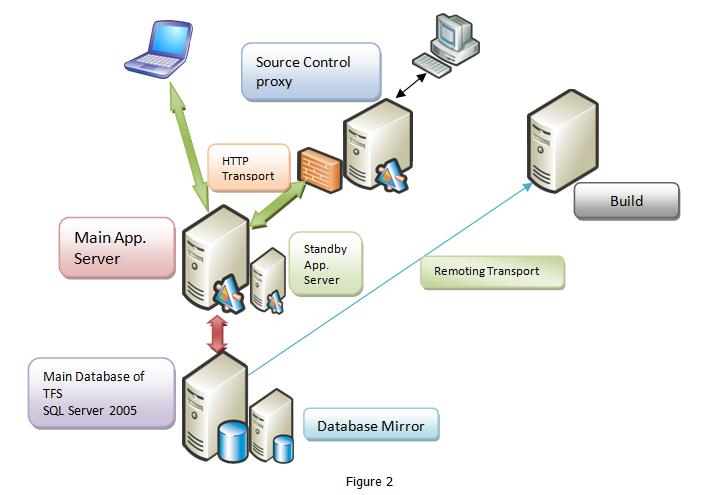
It is possible to create a single tier architecture for installations which do not demand high scalability. It is suggested that for any non-trivial installation the data layer and the application layer should be on different servers to meet the scalability and reliability requirements. For meeting the requirements of teams which are geographically scattered and connected through internet, TFS provides the ability to use proxy to fulfill the requirements of distant users. Although proxy will be caching the source code, main source control where changes are allowed to be stored is where the main installation of TFS is. It is also suggested to have a separate build server since the build activity is very highly CPU intensive. Keeping the main TFS and build server on same machine with frequent builds may hamper the performance of TFS adversely. Fig 2 shows the suggested physical architecture of TFS for any non trivial installation.
Services Offered by TFS
The main set of services offered by TFS are to improve collaboration between multiple users. We can enumerate those as shown in Figure below
Source Code Control (SCC)
SCC is the major contributor to Software Configuration Management. SCC in TFS includes normal version control, Branching, Merging, Shelving and Unshelving etc. TFS maintains the source control in SQL Server 2005. By default it allows multiple check-out. We can place locks in such a way that either the locked files cannot be checked out or if they are checked out they cannot be checked in. TFS also supports check-in policies which make it mandatory on the team members to execute certain actions when they are checking in some source code.
SCC also works as a point of convergence between the team project and the technological solution. Team project allows for architecture, collaboration, monitoring and control of the project. It is very peripherally concerned with the technology. The technological solution does not involve itself with project management or versioning etc. Every unit of source code to be generated is tagged with a work item. Work item store the management data about the technological entities. Storage and management of work items is done through SCC.
Project Portal
For every team project TFS creates a SharePoint portal site. This site contains sections for Process guidance, Reports and documents. It provides appropriate permissions to contributors, readers and guests. Through the process guidance we can learn about the process template that is selected for the project. Various reports provide the health and progress of the project. Clients can have a look at the reports even across the Internet for status monitoring.
Work Item Tracking
Work items are tagged collection of data representing some abstract entities like task, bug, Quality of Service Requirement etc. We need to monitor status of each of these entities. At the same time each work item and entity pair will belong to a user at any given moment. The user will work upon the entity like task or bug and then either set the status of the work item to close or re-assign it to some other user for further work on the entity. TFS keeps track of status of each work item and the user who owns that work item at that time.
Build Automation
Each developer compiles the application in his / her workspace on the local machine. After compilation the code is checked in the source code control. The checked in code has to be built to ensure its interoperability with code created at other time, maybe, by some other developers. This build process should be carried out periodically to ensure integrity of all the checked in code. TFS allows creation of build at pre-determined time using a component called Team Build. Team build schedules the build script created using MS-Build to be executed at the predetermined time.
Reporting
TFS uses a separate data warehouse to generate reports. There are number of predefined reports as per the process template which are created by default. TFS uses SQL SERVER 2005 Reporting Service to create these reports. Each report indicates either of status of the project, quality of the software which is being maintained, progress of the project. These reports are based upon work items, source code, test results and builds. The status and progress of each is initially stored in the normalized tables in the database. TFS creates the non-normalized entries in the data warehouse for the use of creating reports. Reports Data Warehouse object model allows developers to create custom reports in the form of .rdl files using report designer. These reports can also be made available through the reports site.
Conclusion:
Team foundation server is the engine that powers Visual Studio Team System. It offers scalable multi tier architecture. It utilizes latest and best technologies like ASP.NET 2.0, Windows SharePoint Services, SQL Server 2005 etc. It offers services that allow collaboration of users and integration of all tools used by various roles configured in VSTS. Services it offers are Source Control, Team Build, Reporting, Work Item Tracking and Project Portal.
I hope this article was useful and I thank you for viewing it. If you liked the article, please subscribe to my RSS feed over here.
23 November 2012
SQL Server Error - Saving Changes in not permitted. The changes you have made require the following tables to be dropped and re-created. You have either made changes to a table that can’t be re-created or enabled the option Prevent saving changes that require the table to be re-created
Description
I have installed SQL Server 2008 in my laptop after successfully installed
I opened SQL Server Management studio and created new table like this
 |
Once the table is created open the table in SQL Server Management studio
and right click and select “Design” option Once the table is opened try to
add or modify the existing columns in table and try to save then it will through error like
“Saving Changes in not permitted. The changes you have made require
the following tables to be dropped and re-created. You have either made
changes to a table that can’t be re-created or enabled the option
Prevent saving changes that require the table to be re-created”
 |
After seen this error message I realized that “Prevent saving changes that require table re-creation” option was enable by default because of that we are getting this problem.
Follow below steps to solve this problem
1) Open SQL Server Management Studio
2) Go to Tools
3) In that go to Options
4) In leftside treeview select Designers
5) In Designers select Table and Designers
6) After that in right side “Uncheck” check box of Prevent saving changes that require
table re-creation
After add above code run your application and check your output it will work for you
Demo
 |
Now modify your table and save it now that table will save successfully into your database
Difference between char , Varchar and nVarchar
Char DataType
Char datatype which is used to store fixed length of characters.
Suppose if we declared char(50) it will allocates memory for 50 characters.
Once we declare char(50) and insert only 10 characters of word
then only 10 characters of memory will be used and other 40 characters of memory will be wasted.
varchar DataType
Varchar means variable characters and it is used to store non-unicode characters.
It will allocate the memory based on number characters inserted.
Suppose if we declared varchar(50) it will allocates memory of 0 characters
at the time of declaration. Once we declare varchar(50)
and insert only 10 characters of word it will allocate memory
for only 10 characters.
nvarchar DataType
nvarchar datatype same as varchar datatype but only difference
nvarchar is used to store Unicode characters and it allows you to
store multiple languages in database. nvarchar datatype will take twice
as much space to store extended set of characters as required by other languages.
So if we are not using other languages then it’s better to use
varchar datatype instead of nvarchar
22 November 2012
Difference between Asp.net SessionState and ViewState in C#
View State:
- View state is maintained in page level only.
- View state of one page is not visible in another page.
- View state information stored in client only.
- View state persist the values of particular page in the client (browser)
when post back operation done.
- View state used to persist page-instance-specific data.
- View state used to persist page-instance-specific data.
Session State:
- Session state is maintained in session level.
- Session state value is available in all pages within a user session.
- Session state information stored in server.
- Session state persist the data of particular user in the server.
This data available till user close the browser or session time completes.
- Session state used to persist the user-specific data on the server side.
- Session state used to persist the user-specific data on the server side.
Usage
- If you want to access the information on different web pages,
you can use SessionState
- If you want to access from the same page,
then you can use Viewstate
Security
Session state provides more security when compared with
view state as the data value is stored in server side